Send it and track it
Send a document for signature, chase the people who haven't signed, and prove later that they did.
Publishing a document is half of it. eSign > Requests is the other half: who has it, who has signed, who needs chasing, and the evidence when somebody asks.
Before you start: sending needs the eSign send permission, and countersigning as your organization needs the sign permission. Viewing requests and downloading signed copies needs only eSign access.
Three ways to send
New eSign Request takes you through the same builder: the document, the fields, the matching, then Send. Every signer needs an email address before it will go.
There are also public self-serve links, set up in Settings > eSign: one URL anyone can open, type their own name and email, and sign. Each link has a name and a maximum number of uses, so you can put one on a poster without it being open forever.
Watching it land
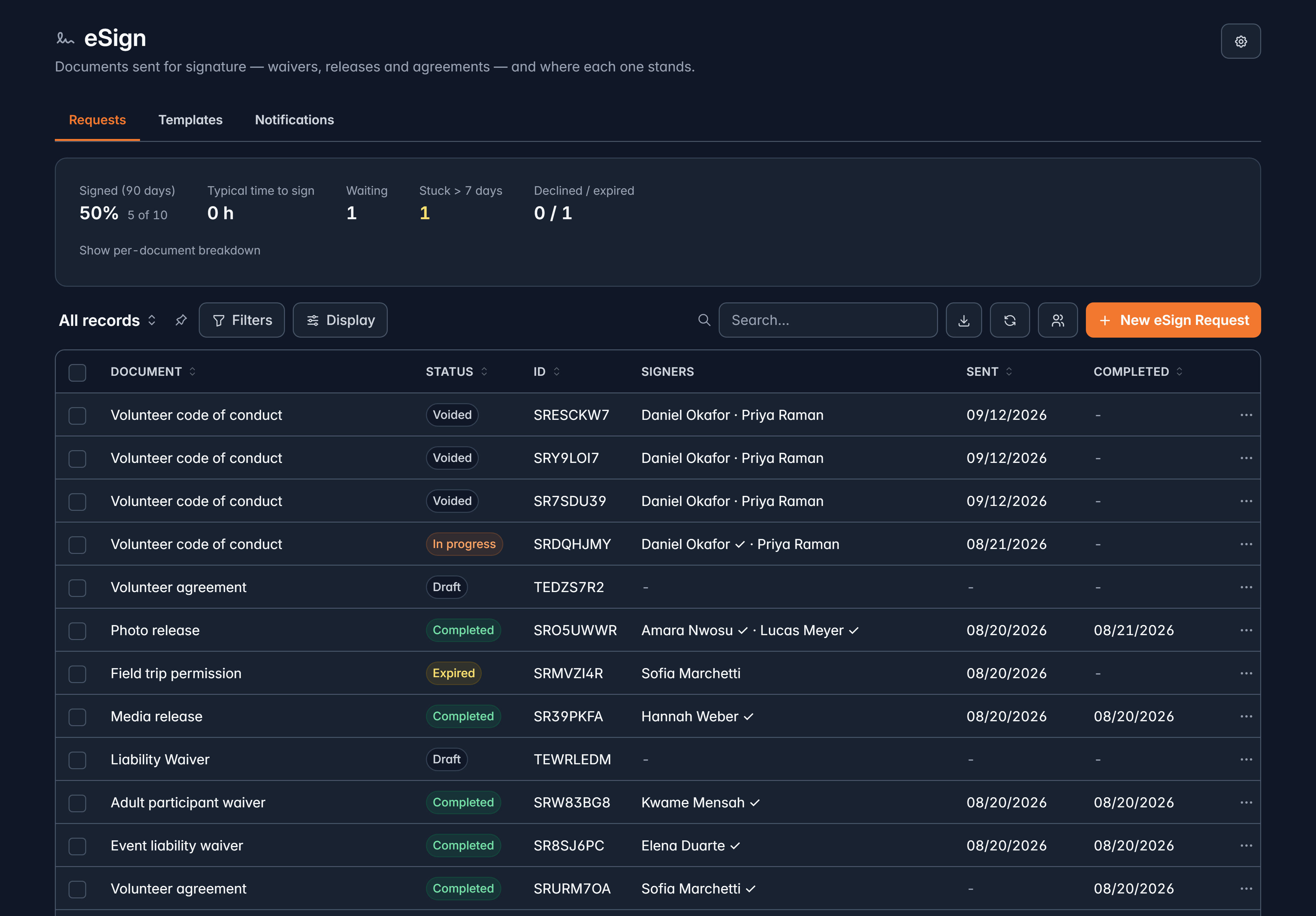
The Requests list shows the document, its status, the signers, when it was sent and when it completed.
| Status | What it means |
|---|---|
| Draft | Started, never sent. |
| Sent | On its way, nobody has signed. |
| In progress | Somebody has signed, somebody has not. |
| Completed | Everyone has signed. |
| Declined | A signer said no, with a reason. |
| Voided | You cancelled it. Links stopped working. |
| Expired | Nobody signed in time. |
Above the list, the completion card shows what was signed in the last 90 days, how long signing typically takes, how many are waiting, how many have been stuck for more than 7 days, and how many were declined or expired. The stuck number is the one to act on.
If something is waiting for your own signature, a card at the top says so with a Sign button.
Chasing, fixing and cancelling
Each row's menu carries what you need on the day:
- Sign in person, which hands your device to them safely: they sign, hand it back, and you stay signed in the whole time.
- Copy link, for pasting into a text message.
- Resend, with a fresh link.
- Fix a typo in a signer's name or email, without voiding anything or starting again.
- They signed on paper, to upload the scan.
- Void, which stops every open link. Signatures already given stay on record.
Reminders are set once, in Settings > eSign: how many days after sending each one goes out, and which template it uses. Each step sends once, counted from when that person's link went out or was last resent.
What a signer sees
They get an email, open a page that names your organization and the document, agree to sign electronically, work through the fields, and sign by drawing, typing or uploading a signature. Then they are told they are done, offered a copy, and emailed one.
They can also decline with a reason, or say I'm not the right person and forward it to whoever is. You see both.
The signing page is available in English, French and Spanish, and works on a phone.
Proving it later
Open any request and the panel holds the evidence:
- When it was sent, completed, and how long the signed copy stays valid, plus how long it is retained.
- Verify signed copy, which checks the stored file against its recorded fingerprint and tells you plainly whether it has been altered.
- Download signed PDF, and Download audit trail CSV.
- Every signer: their role, their email, how they signed, how many times they viewed it, when they agreed and signed, and any decline reason.
- A Timeline of everything that happened, timestamped, from the first send to the final download.
- Legal hold, which keeps a document through the retention purge until you release it, with a reason. That is the one to reach for when something is in dispute.
Retention is yours to set. In Settings > eSign you choose how many years signed documents are kept, or that they are kept indefinitely, with a longer window for documents signed by minors.
Waivers at events
A registration type can require a document. Choose after checkout, so it is emailed and the door warns you when it is unsigned, or at check-in, so it is signed in person and check-in waits until it is.
At the door, an attendee who needs one shows Sign waiver on their row. They sign, and the check-in completes.
Related
Build a document to sign
Fields, signers and publishing.
Build a flow
Send a document for signature automatically.
Still stuck?
We're here for you, and no question is too small. Tell us what you were trying to do and what happened, and we'll help you get it sorted.